Inno Setup 5.1.10 has been released. Download from here, see what's new here.
Tags: Inno Setup
2.22.2007

2.21.2007
Managing Passwords
I use a password manager utility to store all my usernames and passwords in an encrypted database. From time to time I print them out and deposit the list in a safe deposit box as a backup. Each time I do this, I make a mental note of how many entries I'm keeping track of.
When I started using this password manager about five years ago, the database contained 59 entries. Today it has 254.
To quote a favorite line from a favorite movie, "That's a lot of nuts!"
Admittedly, there's some dead wood in there, and a few are entries I maintain for clients to help them out when their memory fails, but I'd guess easily 80% of what's in there represents my own active accounts of one type or another.
What's amazing is how many of the dumb things I can remember without looking them up. Talk about brain clutter...
No real point to this, just the observation that the list has gotten that large and the speculation that most of us -- software developers, anyway -- probably have to keep track of an equal or greater number. What about you: how many usernames and passwords do you need to keep track of?
When I started using this password manager about five years ago, the database contained 59 entries. Today it has 254.
To quote a favorite line from a favorite movie, "That's a lot of nuts!"
Admittedly, there's some dead wood in there, and a few are entries I maintain for clients to help them out when their memory fails, but I'd guess easily 80% of what's in there represents my own active accounts of one type or another.
What's amazing is how many of the dumb things I can remember without looking them up. Talk about brain clutter...
No real point to this, just the observation that the list has gotten that large and the speculation that most of us -- software developers, anyway -- probably have to keep track of an equal or greater number. What about you: how many usernames and passwords do you need to keep track of?
2.20.2007
Article on Potential Windows Installer Issues under Windows Vista
Windows Installer MVP Stefan Krueger has published 7 Reasons Why your Installations May Fail on Windows Vista (And How You Can Fix Them). A short and useful read with the focus on Windows Installer technology, Krueger discusses the issues and offers solutions to some potential problems you may encounter with MSI deployments under Windows Vista. The article is available on the Macrovision website at www.macrovision.com/company/news/newsletter/tips/is_vista.shtml.
Krueger also runs InstallSite.org, a forum for installation developers. Over the years I've found this site to be full of good resources, particularly relating to Windows Installer.
Tags: Windows Installer, Windows Vista, Stefan Krueger, InstallSite.org, Macrovision
Krueger also runs InstallSite.org, a forum for installation developers. Over the years I've found this site to be full of good resources, particularly relating to Windows Installer.
Tags: Windows Installer, Windows Vista, Stefan Krueger, InstallSite.org, Macrovision
2.19.2007
SnagIt update fixes conflict with Logitech mouse software
The latest SnagIt update v8.2.1 fixes a show-stopper issue earlier versions had with some Logitech mouse software. I ran into this problem yesterday after installing the software for a new Logitech® VX Revolution™ cordless laser mouse on my laptop PC. When hovered over the SnagIt v8.2 window, the mouse icon flashed rapidly—it appeared to be alternating between the normal arrow icon and the wait/busy hourglass icon—and clicking anything in the SnagIt window had no effect.
In my experience this problem did not occur with older Logitech mouse software: I've been using a Logitech MX 1000 cordless laser mouse on my desktop machine for a long time and there were no conflicts with SnagIt v8.2 or earlier. In any case, the v8.2.1 update resolved the problem with the new Logitech mouse software on my laptop PC.
BTW, the VX Revolution cordless laser mouse is without doubt the best notebook mouse I've ever used, and ditto for the MX 1000 cordless laser desktop mouse. When my desktop mouse bites the dust I'm sure I'll be looking to replace it with the latest MX model from Logitech.
Tags: SnagIt, Logitech, laser mouse
In my experience this problem did not occur with older Logitech mouse software: I've been using a Logitech MX 1000 cordless laser mouse on my desktop machine for a long time and there were no conflicts with SnagIt v8.2 or earlier. In any case, the v8.2.1 update resolved the problem with the new Logitech mouse software on my laptop PC.
BTW, the VX Revolution cordless laser mouse is without doubt the best notebook mouse I've ever used, and ditto for the MX 1000 cordless laser desktop mouse. When my desktop mouse bites the dust I'm sure I'll be looking to replace it with the latest MX model from Logitech.
Tags: SnagIt, Logitech, laser mouse
2.10.2007
Cool tool for presenters
Mark Russinovich of Sysinternals (which was acquired by Microsoft last summer) has written and released ZoomIt, a free tool for presenters. ZoomIt provides a screen magnifier, a drawing pen and a break timer, each available via its own hotkey combination. The pen can be used with or without the magnifier, and the break timer remains active even if you Alt+Tab to a different task. IMO a highlighter would be more useful than a pen, and the timer evidently resets itself if you use one of the other two tools, otherwise it could be used as a session timer for shorter presentations that don't include breaks. Still, it's one more neat little tool you can use to help make your presentations more effective. Information and and a download link available at www.microsoft.com/technet/sysinternals/utilities/zoomit.mspx. And an acknowledgement to fullasagoog.com for picking up the post where I first learned about ZoomIt this evening.
Tags: ZoomIt, Sysinternals, fullasagoog.com
Tags: ZoomIt, Sysinternals, fullasagoog.com
2.09.2007
VMWare IPO
EMC Corporation has announced plans to take 10% of VMWare public via an IPO "sometime this summer." The announcement from VMware President Diane Greene is here, and the press release is here.
Tags: VMWare, EMC Corporation
Tags: VMWare, EMC Corporation
2.08.2007
What's in a name?
A recent thread on foxforum.com pointed out an interesting question about the syntax of the Visual FoxPro INSERT - SQL command. The VFP Help file gives the syntax for this command as
The question raised (and answered) in the forum thread was, can you use an alias for "dbf_name" in an INSERT statement? The answer of course is yes, and most of us probably do so without even thinking about it.
For example, most of us would be perfectly comfortable writing code like this
The answer is, it depends. If there is an open work area whose alias is table1, as in the example above, then VFP inserts the record into the table that's open in that work area (which may or may not be table1.dbf, as we'll see in a minute). If there is no open work whose alias is table1, then VFP looks for a table named table1.dbf either already open under another alias, or not open but existing on disk. If it finds table1.dbf, VFP inserts the record into that table.
When a work area's alias is the same as the name of the table that's open in that work area, there's no ambiguity. But if the alias is different than the table name, things may not work as expected. Therefore it's important to recognize when we're using an alias and when we're using a table name.
Consider the following:
The answer is, Bob's in table2.dbf. The INSERT statement can be read as "insert a record into the table that's open in the work area whose alias is table1". The table that's open in that work area is table2.dbf, so that's where Bob goes.
Similarly, if we follow up with
To avoid confusion, we can tell VFP we're specifying a table name instead of an alias by including the file name extension.
It may be helpful to remember that an alias refers to a work area, not to a specific table. In any case, the point is it's important to know when "dbf_name" is an alias and when it's a table name in a VFP INSERT statement.
Tags: Visual FoxPro
INSERT INTO dbf_name [(FieldName1 [, FieldName2, ...])]where "dbf_name" is defined as "the name of the table for appending a new record".
VALUES (eExpression1 [, eExpression2, ...])
The question raised (and answered) in the forum thread was, can you use an alias for "dbf_name" in an INSERT statement? The answer of course is yes, and most of us probably do so without even thinking about it.
For example, most of us would be perfectly comfortable writing code like this
CREATE TABLE table1 ( cField1 C(10))which creates a table named table1.dbf and adds Bob to it, as expected. But there's a hidden question lurking here: in the INSERT statement, is "table1" the name of a table or the alias of a work area?
INSERT INTO table1 ( cField1) VALUES ( "Bob")
The answer is, it depends. If there is an open work area whose alias is table1, as in the example above, then VFP inserts the record into the table that's open in that work area (which may or may not be table1.dbf, as we'll see in a minute). If there is no open work whose alias is table1, then VFP looks for a table named table1.dbf either already open under another alias, or not open but existing on disk. If it finds table1.dbf, VFP inserts the record into that table.
When a work area's alias is the same as the name of the table that's open in that work area, there's no ambiguity. But if the alias is different than the table name, things may not work as expected. Therefore it's important to recognize when we're using an alias and when we're using a table name.
Consider the following:
CREATE TABLE table1 ( cField1 C(10))Note that table1.dbf is now open in work area 1 using alias table2, and table2.dbf is now open in work area 2 using alias table1, like this:
CREATE TABLE table2 ( cField1 C(10))
CLOSE ALL
USE table1 IN 0 ALIAS table2
USE table2 IN 0 ALIAS table1
-------- ------- ----------So now if we write
WORKAREA ALIAS() DBF()
-------- ------- ----------
1 table2 table1.dbf
2 table1 table2.dbf
-------- ------- ----------
INSERT INTO table1 ( cField1) VALUES ( "Bob")then the question is, where's Bob? In table1.dbf or in table2.dbf?
The answer is, Bob's in table2.dbf. The INSERT statement can be read as "insert a record into the table that's open in the work area whose alias is table1". The table that's open in that work area is table2.dbf, so that's where Bob goes.
Similarly, if we follow up with
INSERT INTO table2 ( cField1) VALUES ( "Carol")then Carol ends up in table1.dbf.
To avoid confusion, we can tell VFP we're specifying a table name instead of an alias by including the file name extension.
INSERT INTO table1.dbf ( cField1) VALUES ( "Ted")This is unambiguous regardless of any aliases currently in use, so Ted ends up in table1.dbf with Carol, and Alice goes in table2.dbf with Bob. (Which is sort of what happens in the movie, I think. Either that, or all four of them ended up in table3. It's been a long time since I saw that movie...)
INSERT INTO table2.dbf ( cField1) VALUES ( "Alice")
It may be helpful to remember that an alias refers to a work area, not to a specific table. In any case, the point is it's important to know when "dbf_name" is an alias and when it's a table name in a VFP INSERT statement.
Tags: Visual FoxPro
1.13.2007
Tagged! Five Things
I got tagged by Alex Feldstein, so in the spirit of the game here are five things you might not know about me:
1. I lived overseas for several years while growing up. My dad was in the Foreign Service and we got an assignment to a new country every two or three years. Each move meant learning a new language, adapting to a new culture, adjusting to a new school, and making a new set of friends, but overall it was a great experience.
2. It's been a while since I rode, but I enjoy cross-country touring by motorcyle. My favorite trip is the big circle route from Illinois up into Ontario, Canada, all the way around Lake Superior, and back down the other side. I've done that route three times, I think. Those trips are kind of ancient history now, but I still own the bike.
3. I got my private pilot's license several years ago, something I'd always wanted to do and probably the most fun thing I've ever done. Flight Simulator is great, but there's nothing like flying a real aircraft.
4. I used to teach evening classes in computer programming at our community college. I've always felt that teaching, writing, and giving presentations at conferences and users groups is a genuinely rewarding experience and a nice change of pace from the actual practice of doing software design and development all day.
5. My family and I are on a quest to visit all 30 major league baseball parks. So far we've been to 17 of them. Planning vacation trips to coincide with home games in two or three cities in the same week can be challenging, but it's great fun. Mostly what we have left are the Northeast and Southern California ballparks.
Let's see, who haven't we heard from for a little while (or in some case, for a long while)? I tag:
Dave Bernard
Craig Boyd
Esparta Palma (in Mexico)
Emerson Reed (in Brazil)
David Stevenson
1. I lived overseas for several years while growing up. My dad was in the Foreign Service and we got an assignment to a new country every two or three years. Each move meant learning a new language, adapting to a new culture, adjusting to a new school, and making a new set of friends, but overall it was a great experience.
2. It's been a while since I rode, but I enjoy cross-country touring by motorcyle. My favorite trip is the big circle route from Illinois up into Ontario, Canada, all the way around Lake Superior, and back down the other side. I've done that route three times, I think. Those trips are kind of ancient history now, but I still own the bike.
3. I got my private pilot's license several years ago, something I'd always wanted to do and probably the most fun thing I've ever done. Flight Simulator is great, but there's nothing like flying a real aircraft.
4. I used to teach evening classes in computer programming at our community college. I've always felt that teaching, writing, and giving presentations at conferences and users groups is a genuinely rewarding experience and a nice change of pace from the actual practice of doing software design and development all day.
5. My family and I are on a quest to visit all 30 major league baseball parks. So far we've been to 17 of them. Planning vacation trips to coincide with home games in two or three cities in the same week can be challenging, but it's great fun. Mostly what we have left are the Northeast and Southern California ballparks.
Let's see, who haven't we heard from for a little while (or in some case, for a long while)? I tag:
Dave Bernard
Craig Boyd
Esparta Palma (in Mexico)
Emerson Reed (in Brazil)
David Stevenson
1.08.2007
FeedDemon 2.1 Help File now available as PDF
The Help file for NewGator's popular FeedDemon feed reader is now available as a PDF. Previously, FeedDemon Help has been available only online. The NewsGator KB article DOC: FeedDemon 2.1 Offline help file has the link for downloading the PDF. Thanks to NewGator's Jonathon McDougall for posting this news on the FeedDemon technical support forum.
Tags: FeedDemon
Tags: FeedDemon
1.05.2007
Font Xplorer is now free
Font Xplorer 1.2.2 from Moon Software is now available for free. A few years ago when I was looking for a font utility, I found this one and liked it well enough to pay for it. Now the author is making this version free, evidently as an incentive to himself to get a new version out the door this year (an interesting approach to self motivation). Moon Software also offers Password Agent, a fine password manager, as well as several little free utilities.
Tags: Font Xplorer, Moon Software
Tags: Font Xplorer, Moon Software
12.19.2006
Aardvark for Firefox 2.0
Aardvark, a nifty Firefox extension for Web developers and designers, has now been updated to work with Firefox 2.0. Available from the author's website at karmatics.com/aardvark/.
Tags: Aardvark, Firefox
Tags: Aardvark, Firefox
12.14.2006
Styling FinalBuilder HTML Build Logs
FinalBuilder generates a log as it processes each step in your build process. The Export Log action enables you to export the build log to a file. The default format for this file is HTML, which generates a nicely formatted report including expandable sections to view the detail for steps that generated console output during the build process.
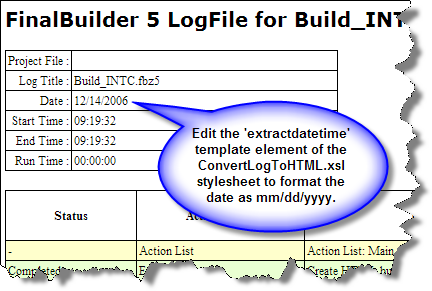
I noticed today, however, that the date in the header portion of the HTML log was rendered as 14/12/2006 rather than month/day/year format of 12/14/2006 we are accustomed to in the United States. As it turns out, this is easily changed.
The format and appearance of the HTML output is determined by an XSL stylesheet. The default stylesheet is named ConvertLogToHTML.xsl located in the StyleSheets sub-folder where FinalBuilder is installed. To change the format of the date, simply edit the 'extractdatetime' template element and reverse the order in which the month and day parts of the datetime string are extracted.

The FinalBuilder export log options enable you to specify the default export format (XML, HTML, or Text) as well as the default XSL stylesheets for HTML and Text output. While changing the format of a date is a trivial example, the ability to edit the default stylesheets or even replace them with entirely different ones gives you complete control over the format and appearance of your build logs.
Footnote: The FinalBuilder website today is featuring a 20% discount off FinalBuilder or Automise through December 30th.
Tags: FinalBuilder
I noticed today, however, that the date in the header portion of the HTML log was rendered as 14/12/2006 rather than month/day/year format of 12/14/2006 we are accustomed to in the United States. As it turns out, this is easily changed.
The format and appearance of the HTML output is determined by an XSL stylesheet. The default stylesheet is named ConvertLogToHTML.xsl located in the StyleSheets sub-folder where FinalBuilder is installed. To change the format of the date, simply edit the 'extractdatetime' template element and reverse the order in which the month and day parts of the datetime string are extracted.
The FinalBuilder export log options enable you to specify the default export format (XML, HTML, or Text) as well as the default XSL stylesheets for HTML and Text output. While changing the format of a date is a trivial example, the ability to edit the default stylesheets or even replace them with entirely different ones gives you complete control over the format and appearance of your build logs.
Footnote: The FinalBuilder website today is featuring a 20% discount off FinalBuilder or Automise through December 30th.
Tags: FinalBuilder
12.08.2006
Save Ten Bucks at NewsGator
Nick Bradbury blogs today that you can save ten bucks on any of NewsGator's products this month. This includes FeedDemon, IMO the best desktop feed reader there is. Get the official word and the promo code from Nick's blog at nick.typepad.com/blog/2006/12/save_ten_bucks_.html.
Tags: NewsGator, FeedDemon, Nick Bradbury
Tags: NewsGator, FeedDemon, Nick Bradbury
11.29.2006
Great One-day Deal on Automise
News today from VSoft Technologies, publishers of FinalBuilder, that their companion product Automise is featured on Bits du Jour today at a whopping 90% discount. Bits du Jour is a "One deal a day" website that features software products. Today's deal is Automise for $19.50 against a regular price of $195.00.
VSoft Technologies describes Automise as "very similar to FinalBuilder but aimed at Sys Admin, Network Admins and other IT professionals. It's got the power and ease of use of FinalBuilder, but is cheaper and lacks the developer specific stuff (like compilers, version control systems, etc)."
FinalBuilder is a powerful tool for software developers to automate the process of building their software release packages. I've been using FinalBuilder for several months now and it's become one of those indispensable products you wonder how you ever got along without. Looks like Automise could be equally useful, and you certainly can't beat today's price.
Tags: Automise, FinalBuilder, VSoft Technologies, Bits du Jour
Footnote: Bits du Jour has an RSS feed at http://bitsdujour.com/blog2/wordpress/?feed=rss2.
VSoft Technologies describes Automise as "very similar to FinalBuilder but aimed at Sys Admin, Network Admins and other IT professionals. It's got the power and ease of use of FinalBuilder, but is cheaper and lacks the developer specific stuff (like compilers, version control systems, etc)."
FinalBuilder is a powerful tool for software developers to automate the process of building their software release packages. I've been using FinalBuilder for several months now and it's become one of those indispensable products you wonder how you ever got along without. Looks like Automise could be equally useful, and you certainly can't beat today's price.
Tags: Automise, FinalBuilder, VSoft Technologies, Bits du Jour
Footnote: Bits du Jour has an RSS feed at http://bitsdujour.com/blog2/wordpress/?feed=rss2.
11.28.2006
Powermarks for Firefox 2.0
When I blogged recently about my favorite extensions for Firefox, I mentioned four that were not compatible with Firefox 2.0. One has now been updated: Powermarks 3.5 Build 387 is available for download and is working fine with Firefox 2.0.
Tags: Firefox 2.0, Powermarks
Tags: Firefox 2.0, Powermarks
QuickBooks Pro 2007 Update Problem & Solution
Today when I launched QuickBooks Pro 2007, it prompted me to install an update it had automatically downloaded. The update ran normally for a while, but then at a point where it was running something in a visible command window, the command window showed that three items failed to run because they were "not recognized as in internal or external command." The three items are Components\QBAgent\QBMsgMgr.exe, Components\QBAgent\qbdagent2002.exe, and axlbridge.exe.
This was followed immediately by a File Copy Failure dialog containing the message QuickBooks failed to update all files because some of these files are being used by QuickBooks and its related components. Please re-start your computer and run "postpatch.bat" in the QuickBooks application directory.
Don't you love it when this kind of stuff happens?
Nothing related to QuickBooks was running at the time, save for the update itself and the QB automatic update detection process, which always runs. Hard to believe that would interfere with an update, but at this point that was my only guess.
After re-starting the machine I killed the QB automatic update detection process, ran postpatch.bat and encountered the same error. So contrary to the original error message, the problem is evidently not related to files being in use by QuickBooks.
I inspected the batch file and found that it registers several components, then tries to register the three files mentioned above. Fortunately, these three are grouped together in a section of the batch file commented as Needed for Payroll feature, which provided the clue to the reason for the failure: I don't have the payroll feature installed. A quick check of the QuickBooks application directory confirmed that these three files are not present on my machine, which of course explains the error.
While this turned out to be relatively minor annoyance, it cost me some time and is something Intuit should have caught in testing before releasing the update. Fortunately, it appears the rest of the update installed correctly.
Tags: QuickBooks 2007
This was followed immediately by a File Copy Failure dialog containing the message QuickBooks failed to update all files because some of these files are being used by QuickBooks and its related components. Please re-start your computer and run "postpatch.bat" in the QuickBooks application directory.
Don't you love it when this kind of stuff happens?
Nothing related to QuickBooks was running at the time, save for the update itself and the QB automatic update detection process, which always runs. Hard to believe that would interfere with an update, but at this point that was my only guess.
After re-starting the machine I killed the QB automatic update detection process, ran postpatch.bat and encountered the same error. So contrary to the original error message, the problem is evidently not related to files being in use by QuickBooks.
I inspected the batch file and found that it registers several components, then tries to register the three files mentioned above. Fortunately, these three are grouped together in a section of the batch file commented as Needed for Payroll feature, which provided the clue to the reason for the failure: I don't have the payroll feature installed. A quick check of the QuickBooks application directory confirmed that these three files are not present on my machine, which of course explains the error.
While this turned out to be relatively minor annoyance, it cost me some time and is something Intuit should have caught in testing before releasing the update. Fortunately, it appears the rest of the update installed correctly.
Tags: QuickBooks 2007
11.27.2006
HowTo: Remove Outlook 2007 Instant Search Prompt

If you've installed Outlook 2007 but declined to install the optional Instant Search feature, Outlook continues to prompt you to enable Instant Search by displaying a clickable banner beneath the currently open folder name. You can remove this banner by unchecking the "Show prompts to enable Instant Search" checkbox under Tools ¦ Options ¦ Other ¦ Advanced Options.
Tags: Outlook 2007, Instant Search
Tags: Outlook 2007, Instant Search
11.20.2006
Developer Resources for Office 2007
Jensen Harris has published some Developer Resources for Office 2007 RTM. Harris notes these resources will eventually be available on MSDN but you can get them now via his blog. The first post has links for the Control ID list (in Excel format) and the CustomUI schema. Thanks to TheServerSide.NET for the link.
Harris is Group Program Manager of the Microsoft Office User Experience Team. Another valuable resource I noted on his site is The Office 2007 UI Bible, an organized list of links to his various posts on the why's and wherefore's of the Office 2007 user interface. Looks like good reading.
Tags: Office 2007, Jensen Harris, TheServerSide.NET
Harris is Group Program Manager of the Microsoft Office User Experience Team. Another valuable resource I noted on his site is The Office 2007 UI Bible, an organized list of links to his various posts on the why's and wherefore's of the Office 2007 user interface. Looks like good reading.
Tags: Office 2007, Jensen Harris, TheServerSide.NET
11.19.2006
Installed Office 2007
I took a deep breath and installed Office 2007 as an upgrade on top of Office 2003 this afternoon. Since I rely on Outlook for a lot of things I hedged a little and backed up up my .pst files first, but other than that I decided to just fire up the installer and see how it went.
Answer: it went very smoothly. And unlike Craig Berntson's experience, no reboot was required (although Craig had a beta previously installed and I didn't, which might be the difference).
The only glitch with a 3rd party product I've seen so far occurred when I first fired up Outlook. Outlook advised me the avast! Outlook/Exchange plugin had a problem and asked if I wanted to disable it. I said yes and Outlook came up normally, after which I was able to start the Outlook/Exchange provider from the avast! menu. Looks like a trip to the avast! support forum is in order for this one.
On the other hand, my Qurb spam blocker continues to work in Outlook 2007 with no problems, which was a big relief because Qurb was absorbed by CA some time ago and is no longer supported under that name.
The new ribbon control in Word, Excel, etc. is going to take some getting used to, but probably not as much as I'd initially thought. And although I like blue as much as the next person, the default blue color scheme was immediately too much for me. Changing it to silver was easy, though, which put it more in line with my XP color scheme and made me a happy camper again.
I'm sure there's a lot to learn here, but so far so good. Next step: testing Office 2007 automation from VFP.
Tags: Office 2007, Visual FoxPro
Answer: it went very smoothly. And unlike Craig Berntson's experience, no reboot was required (although Craig had a beta previously installed and I didn't, which might be the difference).
The only glitch with a 3rd party product I've seen so far occurred when I first fired up Outlook. Outlook advised me the avast! Outlook/Exchange plugin had a problem and asked if I wanted to disable it. I said yes and Outlook came up normally, after which I was able to start the Outlook/Exchange provider from the avast! menu. Looks like a trip to the avast! support forum is in order for this one.
On the other hand, my Qurb spam blocker continues to work in Outlook 2007 with no problems, which was a big relief because Qurb was absorbed by CA some time ago and is no longer supported under that name.
The new ribbon control in Word, Excel, etc. is going to take some getting used to, but probably not as much as I'd initially thought. And although I like blue as much as the next person, the default blue color scheme was immediately too much for me. Changing it to silver was easy, though, which put it more in line with my XP color scheme and made me a happy camper again.
I'm sure there's a lot to learn here, but so far so good. Next step: testing Office 2007 automation from VFP.
Tags: Office 2007, Visual FoxPro
11.14.2006
FeedDemon 2.1 released
FeedDemon 2.1 has been released. Like most of Nick Bradbury's software, this version has been through several betas and release candidates, so it should be really solid. There are about four printed pages of new features, changes, and fixes to explore and enjoy. The release notes and download link are at www.bradsoft.com/feeddemon/readme/.
Tags: FeedDemon
Tags: FeedDemon
Subscribe to:
Posts (Atom)